Service Groups
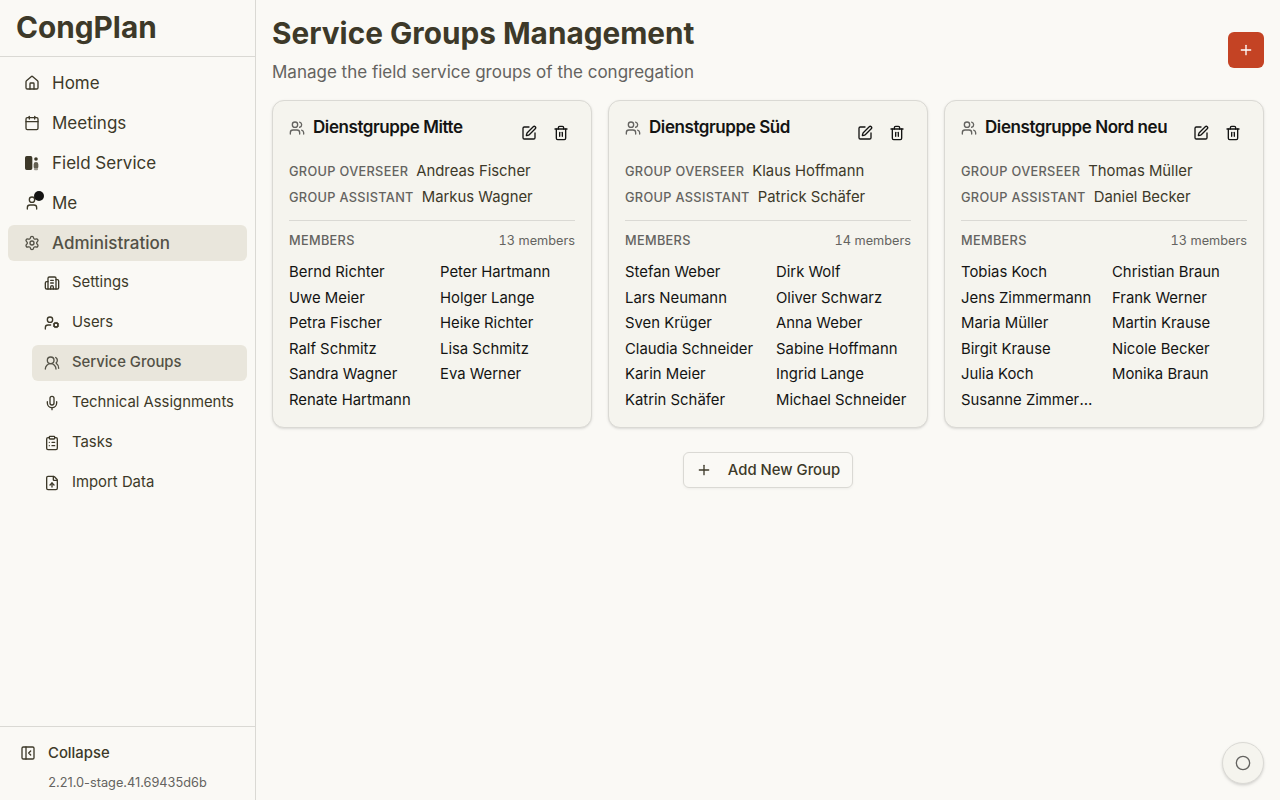
Manage the field service groups of your congregation. The page is titled "Service Group Management" with the subtitle "Manage the field service groups of the congregation."
Overview
Field service groups organize publishers for field ministry coordination. Each group has a group overseer (typically an elder) and optionally a group assistant.
The service group table shows:
| Column | Content |
|---|---|
| Group Name | The name of the service group |
| Group Overseer | The elder leading the group |
| Group Assistant | The assistant to the group overseer |
| Publishers | Publisher count and a preview of assigned publishers |
Creating a Service Group
- Click the Add Group button
- Enter a group name (e.g., "Group North" or a custom name)
- Assign a group overseer from the list of elders
- Optionally assign a group assistant
- Click Save
Assigning Publishers
Each publisher can belong to only one service group at a time. Assign publishers through the user edit sheet or directly from the group view.
info
New users are not assigned to any group by default. Remember to add them to a group after creating their account.
Changing the Group Overseer
- Open the group you want to edit
- Click on the Group Overseer field
- Select a different elder from the dropdown
- Click Save
Deleting a Service Group
- Open the group you want to delete
- Click Delete Group
- Confirm the deletion
warning
Deleting a group will unassign all its publishers. Make sure to reassign them to other groups afterward.