Public Witnessing
Public witnessing lets eligible publishers view scheduled public-witnessing locations and sign up for shifts.
Who Can See It?
Public-witnessing occurrences are visible to:
- Publishers with the Public witnessing assignment eligibility
- Planners with the Manage public witnessing permission
Other users do not receive hidden location data. They see an empty state instead.
Day View
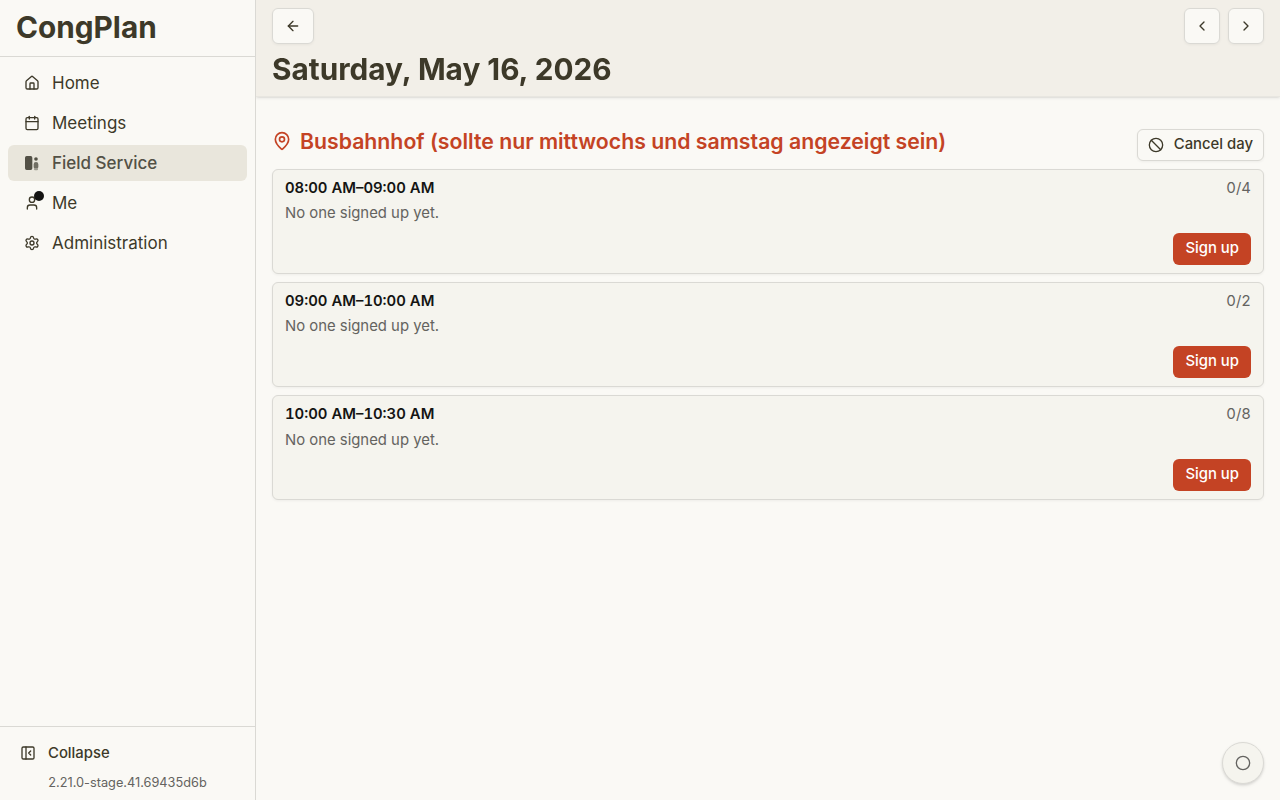
Public witnessing is shown by day. A day can contain one or more locations. Each location contains shifts with:
- Start and end time
- Required number of publishers
- Current signups
- Full or free capacity
- Cancelled state, if the day or location was cancelled
You can move to previous or next public-witnessing days with the navigation buttons. On touch devices, swipe navigation may also be available.
Signing Up
To sign up:
- Open the public-witnessing day
- Find the location and shift
- Select Sign up
If you are already signed up, the card marks your shift. You can cancel your own signup unless the shift state or permissions prevent it.
Your own public-witnessing shifts also belong to your personal plan. That keeps them visible next to meeting parts, technical assignments, field service meetings, tasks, and absences.
Cancelled or Full Shifts
- Full means all required places are already taken
- Cancelled means the occurrence is not taking place
- Over capacity can appear when an existing signup remains after capacity was reduced
If you need help with eligibility or a cancelled shift, contact the person who manages public witnessing for your congregation.
Offline State
Previously loaded public-witnessing days may remain visible while the connection is unavailable. Signing up, cancelling a signup, or changing planner data requires a connection so capacity, permissions, and cancellations can be checked against the current congregation data.