Field Service Groups
Manage the congregation's field service groups from Congregation → Field Service Groups, in the Organisation section. The page is titled "Field Service Groups Management," with the subtitle "Manage the field service groups of the congregation."
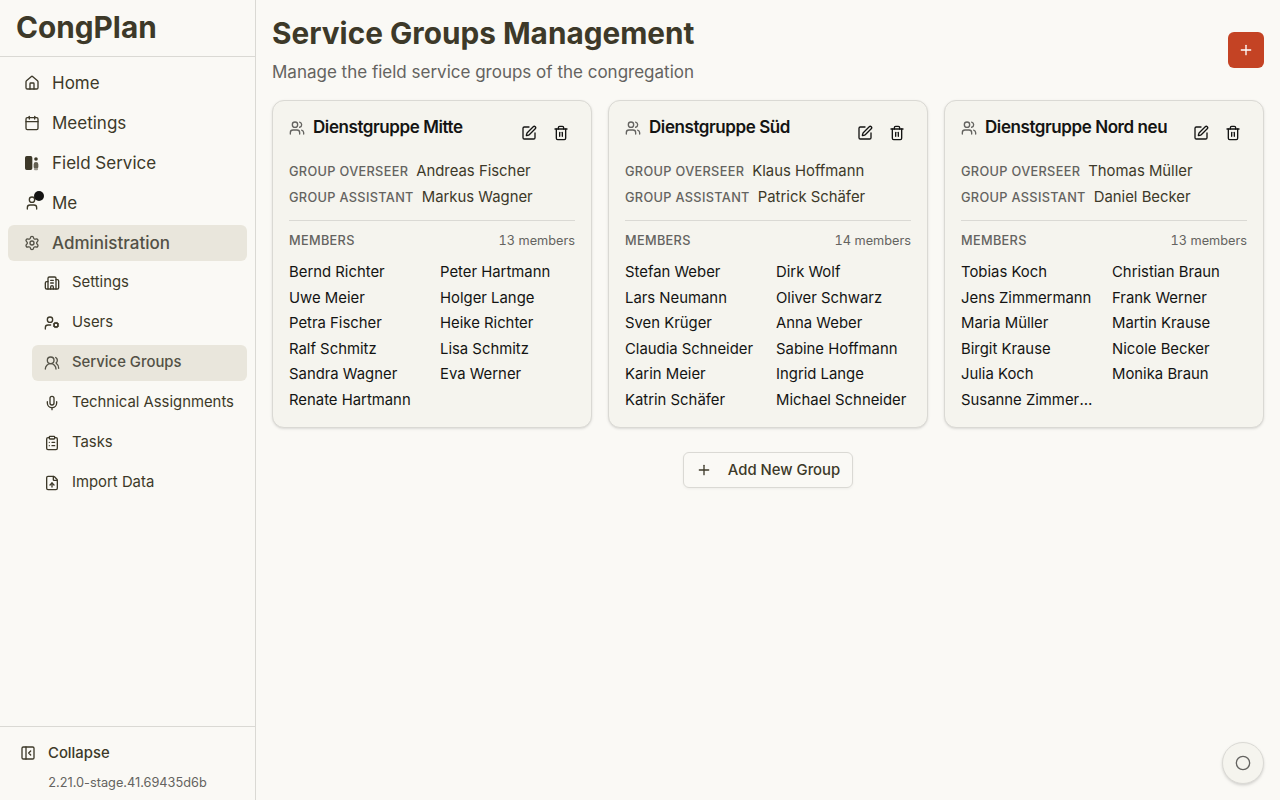
Field service groups organize the ministry; foreign-language groups organize a program in another language — two different entities. See Congregation Groups for how the terms compare.
Overview
Field service groups organize publishers for field ministry coordination. Each group appears as its own card, showing:
- The group's name
- Its leader, titled Group Overseer if he is an elder, or Group Servant otherwise
- Its assistant, if one is assigned
- Its members — a count, and the member list (the leader and assistant are shown separately above and are not repeated in that list)
Leadership Title: Group Overseer or Group Servant
The brother taking the lead in a field service group is titled automatically from his congregation standing: Group Overseer if he is an elder, Group Servant otherwise. This is the same rule CongPlan applies to every field service group leader and to foreign-language group leaders — it is never set manually, and it updates on its own if his standing changes.
Assistants
A group can optionally have an assistant alongside its overseer/servant. The assistant shares day-to-day leadership: like the overseer/servant, they can manage the group's own field service meetings even without the congregation-wide Field Service Meetings permission — see Permissions.
Creating a Field Service Group
- Click Add Group
- Enter a group name
- Add the group's members
- Choose the leader and, optionally, an assistant — both are chosen from the group's members, and the leader's title switches automatically between Group Overseer and Group Servant
- Click Save
Assigning Publishers
Each publisher belongs to at most one field service group at a time. Assign publishers from the group's own member list, or from the user edit sheet.
New users are not assigned to any group by default. Remember to add them to a group after creating their account.
Deactivated Publishers
A deactivated publisher no longer appears as a member, Group Overseer, Group Servant, or assistant of any field service group, and no longer counts toward its member total — even if their assignment was never explicitly removed. Reactivating them restores all of this. See Deactivating and Reactivating Users.
Editing a Group
- Open the group's card
- Click the edit icon
- Change the name, members, leader, or assistant
- Click Save
Printing
With the Field Service Groups edit permission, a print button opens the field service groups printout. It offers a choice between listing only the group's own members or every active publisher in the congregation.
Deleting a Field Service Group
- Open the group's card
- Click the delete icon
- Confirm the deletion
Deleting a group unassigns all its members. Reassign them to other groups afterward.
Permissions
Creating, editing, or deleting groups — and changing their membership or leadership — requires the Field Service Groups edit permission. A group's own leadership (its overseer/servant and assistant) can additionally manage that one group's field service meetings without holding it. See Permissions for the full picture.