Public Talk Planning
Public talk planning has its own page under Congregation > Plan. It shows one continuous, chronological list of your weekend dates and lets you fill in the public talk your congregation hosts — theme, speaker, and the other weekend assignments — directly in the list, without opening a single meeting.
It is built for the way this job is actually done: a planner works down a list of weekends, sees which ones are still open, and fills the gaps.
Local Talk or Outgoing Talk?
CongPlan keeps the two directions of a public talk strictly apart, because they are two different jobs:
- Public talk planning — the talk held at your hall. The speaker comes to you. What you plan here becomes part of your own weekend meeting program: the theme, who gives it, who presides, who conducts the Watchtower Study, who reads. The speaker may be one of your own publishers or a guest speaker from another congregation. This is the page you are reading.
- Outgoing Public Talks — the talk one of your speakers gives elsewhere. Your brother travels away, and the talk belongs to the hosting congregation's program, not to yours. Nothing is planned into your own weekend meeting there; the entry exists so that everyone knows he is away.
A short rule of thumb: who is on our platform this weekend is planned here — where is our brother going is recorded under Outgoing Public Talks.
The two areas are deliberately separate lists. Entering a speaker here does not check his outgoing talks, and an outgoing talk does not appear in this workspace. The list you are working in is always the one that matches its heading.
Opening the Workspace
Open Congregation > Plan > Public talk planning. The page has its own address, so it can be shared or bookmarked.
The entry appears only for planners who may plan weekend programs — see Who May Use It at the end of this page.
One Continuous List
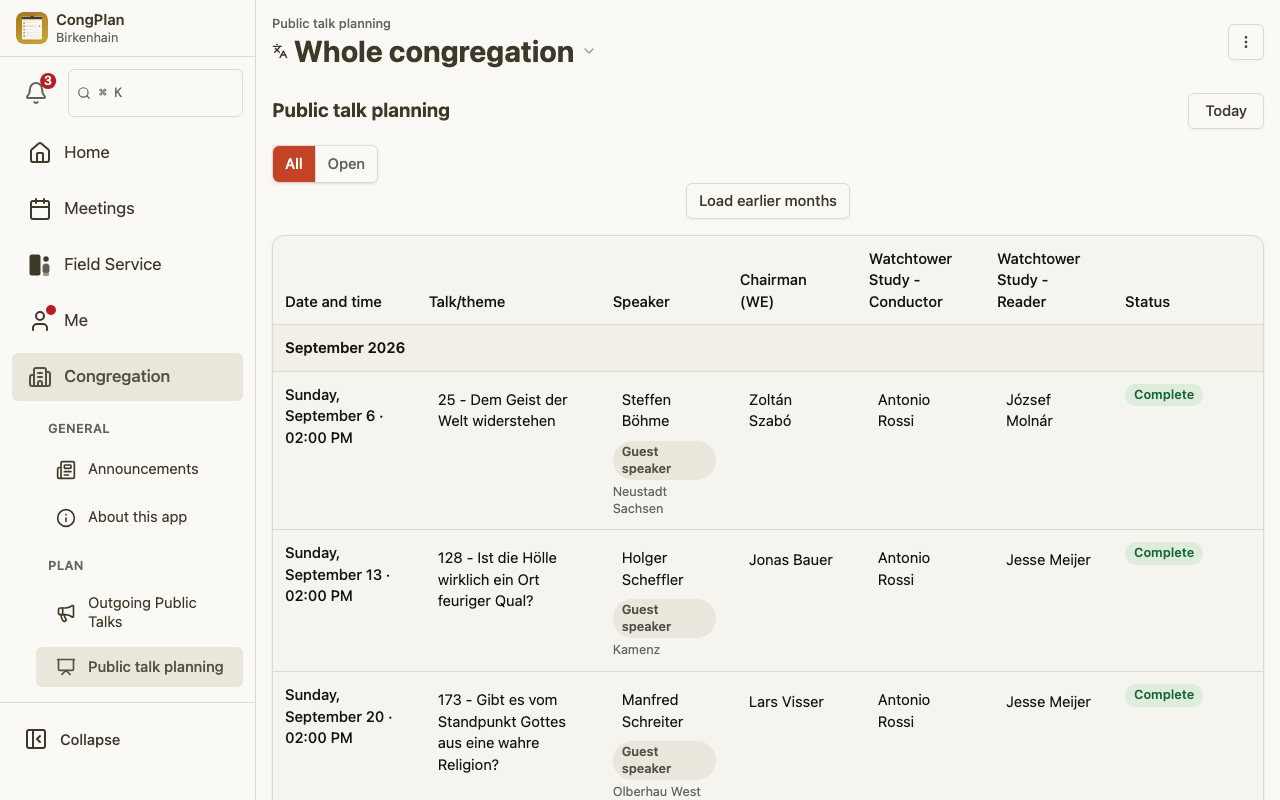
The list opens on the current month plus the following six months and shows every weekend date in chronological order. Each row carries:
| Column | What it holds |
|---|---|
| Date and time | The weekend date, with its meeting time |
| Talk/theme | The theme of the public talk |
| Speaker | Your own publisher, or a guest speaker |
| Chairman (WE) | Who presides over the weekend meeting |
| Watchtower Study - Conductor | Who conducts the study |
| Watchtower Study - Reader | Who reads |
| Status | How complete the weekend is |
Months are headings inside this one list, not pages you step through. That is the point of the design: the turn of the month is visible, and the weekends above it stay on screen.
- Load earlier months and Load more months extend the list by one month at each end. Months already loaded are never thrown away.
- Jump to the next upcoming date moves the view to the next weekend still ahead of you — it does not reload anything.
- Your status filter, scroll position, and keyboard focus survive loading more months, and they survive a colleague's change arriving live while you work.
The Talk Theme
Select the Talk/theme cell and CongPlan opens the shared theme field — the same one the meeting's own program uses. It offers the public talk theme catalog as you type, formatted as number — title, and free text always remains possible for a theme that is not in the catalog. Nothing forces you into the list of suggestions.
Confirm with Apply; Escape or Cancel leaves the cell unchanged.
The catalog is offered in the congregation's language. If no catalog has been imported for that language, the field still accepts free text.
The Speaker
The Speaker cell opens the same person picker the meeting program uses, so both routes behave identically:
- One of your own publishers — chosen from the brothers eligible for the public talk.
- A guest speaker — switch the picker to the guest form and enter his name and his congregation as free text. The row then carries a Guest speaker badge.
If the person you assign already holds another assignment on that same day, the cell shows a Scheduling clash on the same day marker. This check looks at your own congregation's meetings; it does not include outgoing public talks.
The Other Weekend Assignments
Besides the talk itself, three weekend assignments can be filled straight from the list: Chairman (WE), Watchtower Study - Conductor, and Watchtower Study - Reader. They use the same names as the meeting program, so nothing has to be translated in your head between the two views.
Some weekends do not need all of them, and CongPlan says so instead of offering an empty field:
- A weekend that only holds the Watchtower Study has no talk cell.
- A weekend that only holds the public talk has no conductor and no reader.
- Such cells read Not required — a statement about the program, not about your rights.
The reader is a special case worth knowing about. In CongPlan he can sit in two places: as an assistant on the Watchtower Study part (the shape the weekend templates produce) or as a part of his own. Both are valid, and CongPlan writes to whichever one your meeting uses. If both are filled, the cell says Several public talk items and freezes rather than picking a winner — two contradictory answers to "who reads?" are shown to you instead of one of them being silently overwritten. Open the meeting itself to clear that up; see Meeting Details.
Status at a Glance
The Status column summarises each weekend:
| Status | Meaning |
|---|---|
| Complete | Everything this weekend needs is assigned |
| Open | Something is still missing |
| Cancelled | The meeting is cancelled |
| No public talk | This weekend's program holds no public talk |
| Program item missing | The program has no item for this assignment yet |
| Several public talk items | More than one candidate item — resolve it in the meeting |
| Meeting not created yet | The schedule plans this weekend, but no meeting exists |
Filter by status narrows the whole list to Open rows, which turns it into a work list of exactly what is left to do. Where a program item is missing, Add program item takes you to the meeting to complete the program.
Weekends Without a Meeting Yet
A weekend that your meeting schedule plans, but for which nobody has created a meeting yet, is not left out of the list. It appears as its own row with the status Meeting not created yet, so a gap in the plan is visible rather than invisible.
From that row you can create the missing meeting: CongPlan uses the weekend template of the planning context you are in and the date the schedule calculated. The new meeting starts as a draft — exactly like a meeting created anywhere else — and the placeholder row turns into a real, editable row in place, ready for the theme and the speaker. See Meetings for what draft and publish mean.
Such rows are only offered for weekends that are still ahead, and only where a specific congregation or group is selected.
When a Row Cannot Be Edited
The workspace never shows a dead control without saying why. A row or a single cell can be read-only for these reasons:
- The "Together" view is read-only. With several planning contexts combined, a save has no single target. Choose a specific congregation or group first — see Foreign-Language Groups.
- You have no edit rights for this planning context.
- The month lies before the offline sync period. Past months are readable but not editable; the notice appears once above the section, not on every row.
- The meeting is cancelled.
If someone else saves the same row while you are editing it, CongPlan does not overwrite their work: your change is rolled back with a clear notice, and you decide whether to Reload or Discard change.
On Phone, Tablet, and Desktop
Seven columns need width. CongPlan therefore shows:
- the full table from a window width of about 1024 pixels,
- a card list below that — one value per line, with the same cells and the same editors.
Phones and tablets get the card list, which is what makes the workspace usable away from a desk rather than a cramped table.
Who May Use It
The workspace is unlocked by one capability: may this person plan weekend programs? That is either the right to edit weekend meetings for the congregation, or a group they may write to that plans its own weekend meeting.
It is deliberately not a matter of how many rows there are: a planner whose month happens to be empty still gets the workspace. And it is deliberately not unlocked by holding an individual assignment right — being appointed as chairman or reader does not open the planning workspace. Which single rows you may then edit is a second, narrower check.
See Permissions for how these rights are granted.