Data Privacy & Your Data
This page explains, in plain language, how CongPlan handles your data and which tools you have to manage it.
This is a guide, not a legal document. The binding privacy notice and imprint live on the CongPlan website — see Where the legal texts live. Where the two ever differ, the website is authoritative.
Our commitments
- Your data stays with your congregation. Each congregation is isolated; members of one congregation cannot see another's data.
- Secrets are never exported. Passwords, security keys, and device tokens are never part of a data export — only counts of them, where relevant.
- Cookie-free analytics. Usage statistics are collected without tracking cookies.
What data CongPlan processes
At a high level, CongPlan stores the data needed to plan congregation meetings and field service:
- Profile and master data — name, contact details, relevant dates, and roles.
- Assignments and meeting history — who was scheduled for what, and when.
- Requests and notifications — hand-over requests, reminders, and your notification preferences.
- Public schedule visibility — if administrators enable the public QR page, it can show meeting times, field service meeting points, and optionally shortened names for program details.
- Settings and acceptances — your preferences and the legal documents you have accepted.
This is a categorised overview, not a complete register. The authoritative list is in the website privacy notice linked below.
Your rights and the self-service tools
CongPlan builds the most common data-protection rights right into the app.
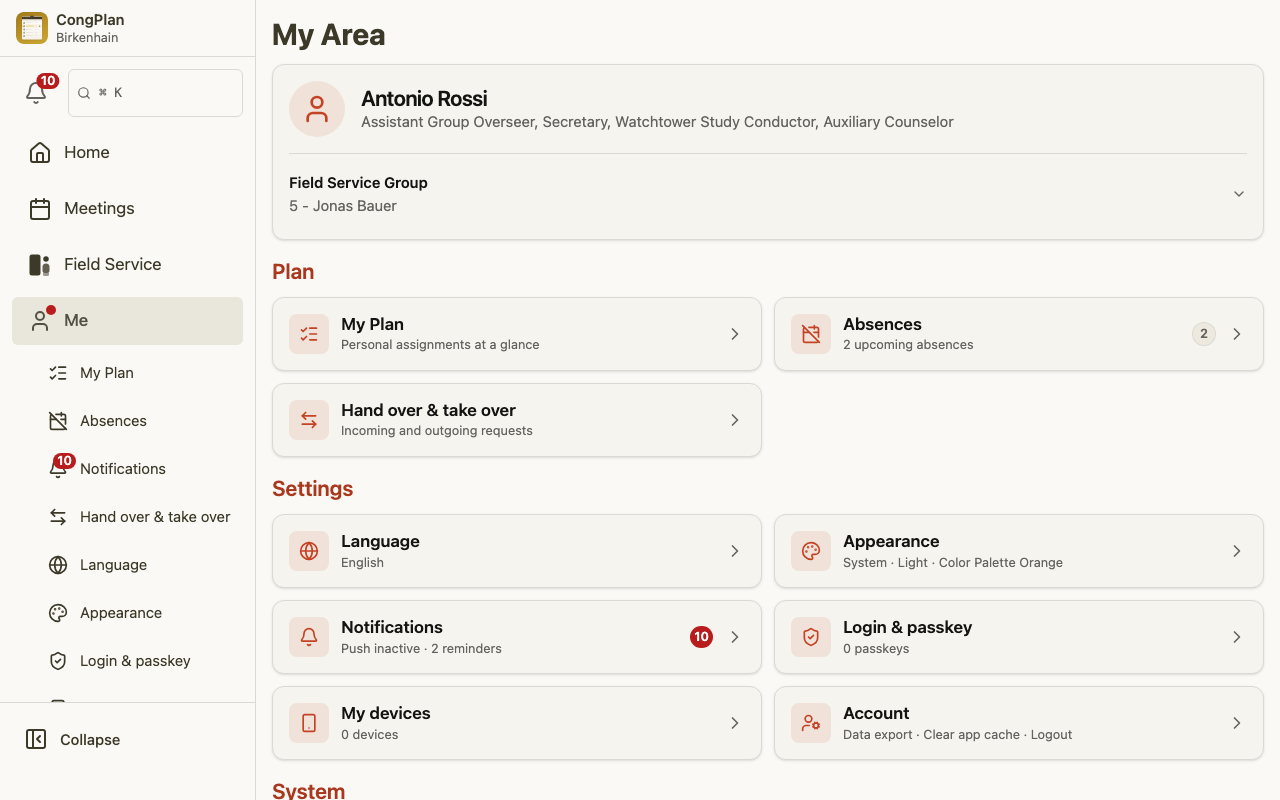
Export your data
Open Me > Account and find the Data export card. Export my data downloads everything stored about you as a machine-readable JSON file (GDPR Art. 15 / 20). Other people appear only as an ID and display name, without their contact details. Any signed-in user can export their own data.
Correct your data
To correct your master data — your name, contact details, or important dates — ask an administrator or secretary of your congregation (GDPR Art. 16). They make the change in user management, and the correction then syncs to everyone.
Public schedule visibility
The public schedule page is controlled by administrators in congregation settings. By default it shows no names. If program details are enabled, names are shortened to first name plus surname initial.
Ask an administrator to review the setting or renew the public link if a QR code was printed with the wrong visibility or shared too widely.
Remove a person (anonymization)
A person with the Users edit permission can anonymize someone from user management (GDPR Art. 17) after confirming the action with a passkey. This permanently removes the person's personal data, credentials, and notifications. The planning and meeting history is kept, but without any personal reference. Anonymization is irreversible — it is not the same as temporarily deactivating an account.
Retention at a glance
- A person is automatically anonymized about 24 months after they were last online. If they never signed in, the period starts when their record was created. The separate Active switch does not affect this timer, so a person still marked active can also be anonymized automatically. This uses the same irreversible process described above.
- The record of changes is kept for 12 months. One period covers both places where CongPlan records a change: the in-app Activity Log, including the change history of an individual record, and the separate record that the automation interface keeps of its own calls. Older entries are deleted automatically, and the period is counted from the date of the change itself.
Two things this period does not do:
- It removes the record of a change, not the data that was changed. A meeting, an assignment, or a person's master data is not deleted because its log entries reached the 12-month mark — each of those follows its own rules.
- It does not clear a deleted object's history early. When a meeting is deleted, the entries about it remain until they reach the 12-month mark themselves.
These are general guidelines; the website privacy notice is authoritative.
Search in this documentation
When you type in the search box of this documentation, the CongPlan usage statistics (Umami) receive the search term you entered, converted to lowercase and cut to 60 characters, together with the path of the page you are on. This happens when you pause typing for one second, and once more if the search finds no result. The search term is sent as you typed it, so please do not enter personal data in the search box.
Where the legal texts live
The binding documents are published on the CongPlan website:
| Document | Link |
|---|---|
| Privacy notice | www.congplan.app/en/privacy (opens in new tab) |
| Imprint | www.congplan.app/en/legal-notice (opens in new tab) |
They cover the data controller, hosting, server logs, analytics, your data-subject rights, the right to object, and how to contact a supervisory authority.
Related
- Activity Log — which changes CongPlan records, which it does not, and who may read them