Public Witnessing Planning
Use public-witnessing planning to maintain recurring plans, locations, shifts, signups, and cancellations.
Public witnessing is integrated with the rest of CongPlan. Planners can maintain the recurring structure, while eligible publishers see available shifts and their own signups in the same app they use for meeting and service assignments.
Access
The planning page requires the Manage public witnessing permission. Publishers only need Public witnessing eligibility to view and sign up for shifts.
Planning Model
Public witnessing has these layers:
| Layer | Meaning |
|---|---|
| Plan | Named planning area, for example a market or city area |
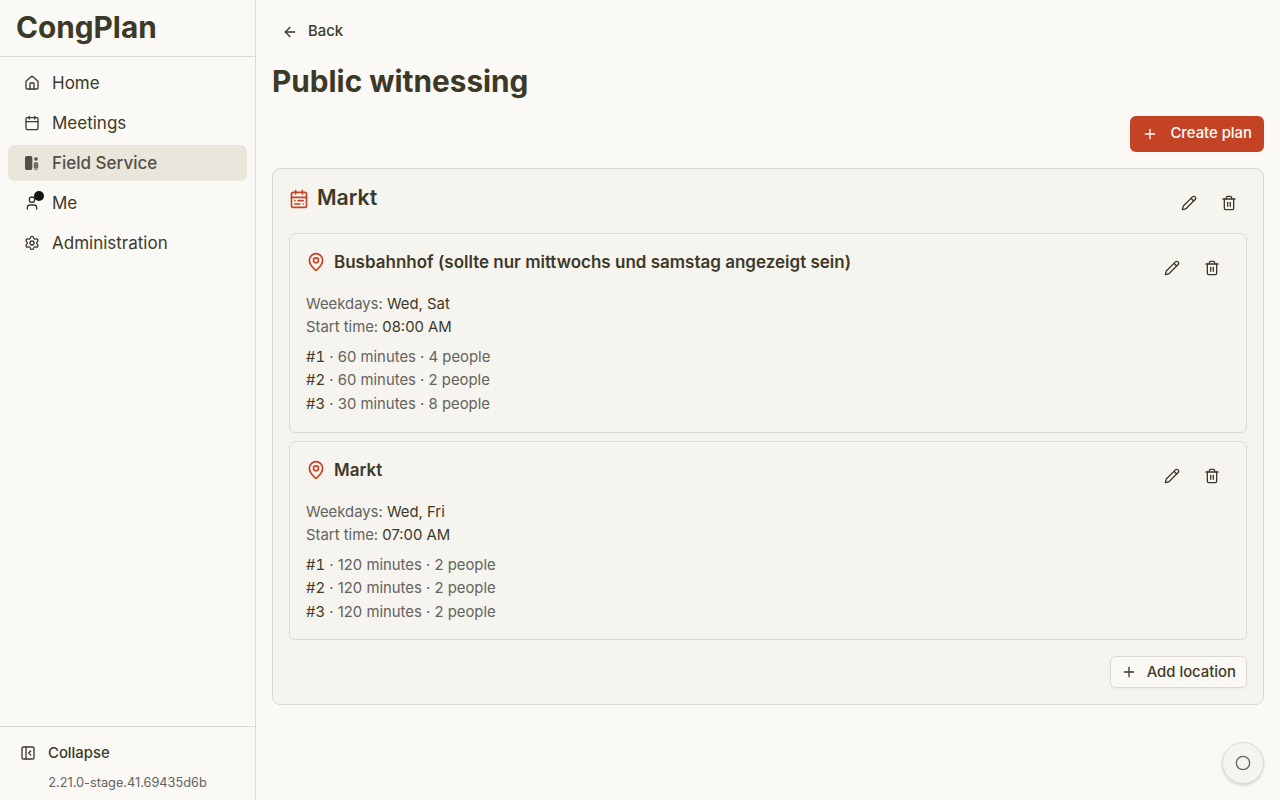
| Location | Specific public-witnessing location inside a plan |
| Weekdays | Days on which a location repeats |
| Shift | Time block with required number of publishers |
| Signup | Publisher entry for a shift |
| Override | Cancellation or exception for one location on a concrete date |
Creating a Plan
- Open the public-witnessing planning page
- Enter a plan name
- Save the plan
- Add one or more locations
Plans can be active or inactive and can optionally have a valid-from and valid-until date.
Locations and Shifts
For each location, maintain:
- Location name
- Weekdays
- Start time
- One or more shifts
- Duration per shift
- Required number of publishers per shift
New shifts can reuse the previous shift's duration and required-count pattern, which speeds up recurring setup.
This keeps recurring setup fast without hiding the concrete date from the planner. You can still adjust one location occurrence with a cancellation or exception when the normal pattern does not apply.
Location Cancellations
Planners can cancel one location on a concrete date and later restore it. Other locations on the same date remain active. The cancelled location stays visible instead of deleting the underlying recurring plan.
Signups
Eligible publishers can sign themselves up. Planners can remove signups when needed, for example after a schedule correction or cancellation.
Publisher self-service reduces manual back-and-forth, but the planner still controls the plan structure, capacity, and exceptions.
Entering Someone Else
With the Manage public witnessing permission, you can enter another publisher into an open shift instead of waiting for them to sign up themselves. Open the public-witnessing day and use Enter another person next to a shift.
The picker lists your congregation's publishers, including those who do not use CongPlan themselves — a CongPlan account is not required to enter someone into a shift. Capacity, duplicate-signup, and cancellation rules apply exactly as they do for a self-signup.
The entered publisher receives a notification about the new shift, and it becomes part of their personal plan like any other signup. See Public Witnessing for what publishers see.
Deleting a plan or location removes the related planning structure and signups. Prefer making a plan inactive or using valid-until dates when the history should remain understandable.