Technical Assignments
Use Congregation > Plan > Technical Assignments to plan technical duties for meeting weeks.
Cleaning and other work outside the meeting program are not technical assignments. Plan them under Tasks, see Plan cleaning and other recurring tasks.
Overview
Technical assignments are separate from meeting parts. The exact roles depend on the congregation's templates, for example stage, microphones, attendants, sound, or video.
The goal is to plan these duties with the same care as visible meeting parts. CongPlan keeps technical roles close to the meeting week, the publisher's qualifications, assignment history, current conflicts, and known absences.
Scheduler
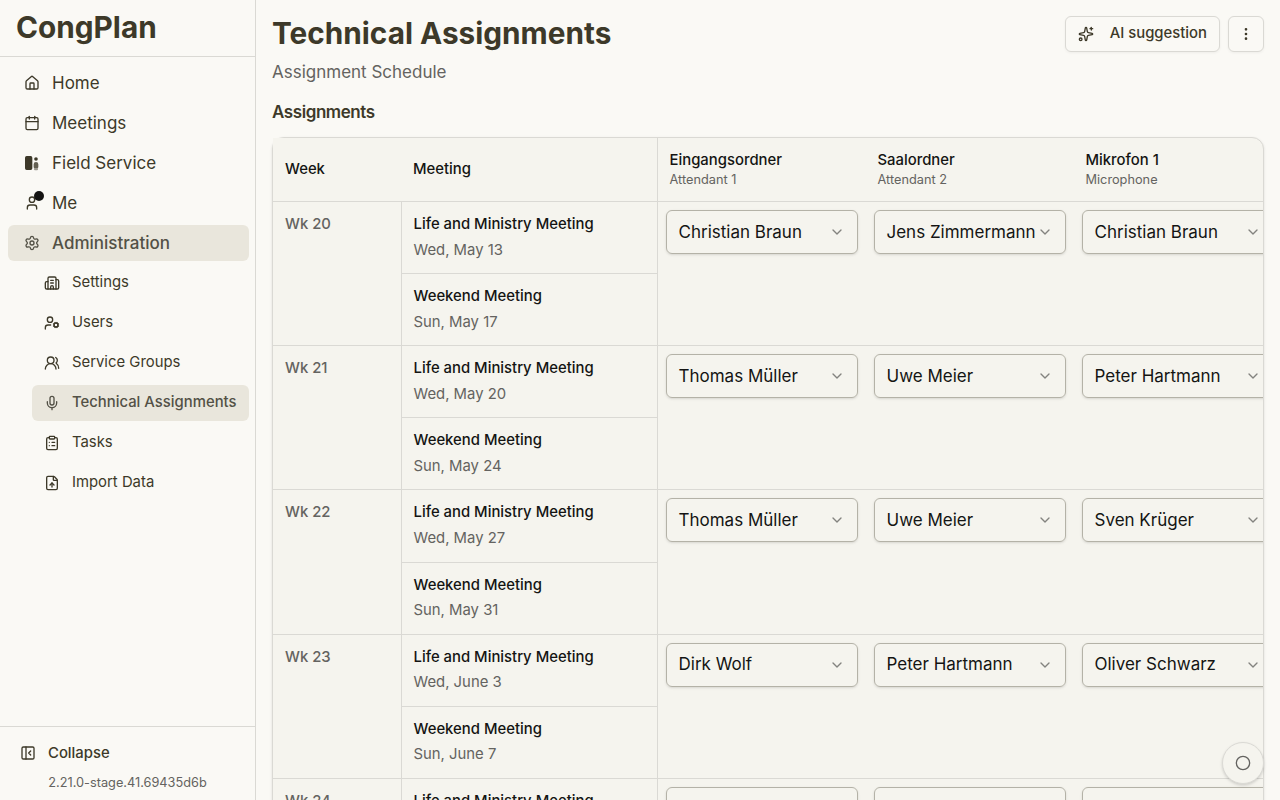
The scheduler shows meeting weeks and assignment slots. Depending on screen size, it renders as a matrix or a mobile-optimized list. A scheduled meeting that has not been created yet remains visible as a dashed placeholder row with an action that takes you to Meetings to create it. The date and meeting type are not prefilled, and the row cannot be assigned until the meeting exists at least as a draft.
Current planning uses pending changes:
- Select an assignment slot
- Choose a qualified publisher
- Review warnings or conflicts
- Save all pending changes
The matrix is useful for broad planning because it shows many weeks and roles at once. On smaller screens, the same work can be handled in a mobile-optimized flow so technical planning remains usable away from a desktop.
Toolbar Actions
The toolbar can include:
- Assignment Templates
- Add default assignments from the active templates
- AI suggestion for generating a proposed plan
Technical duties from New World Scheduler are imported only through the central Data Import wizard under Congregation > System.
Assignment Templates
Assignment Templates opens a full-page sheet. Full administrators configure which role names and counts apply to midweek and weekend meetings there. Other technical planners can use the resulting templates but do not see the template management action.
AI Suggestions
The suggestion dialog can propose assignments for a selected range. Review options such as start week, included assignment types, and whether existing assignments should be overwritten. Suggestions apply only to regular midweek and weekend meetings; rows outside that scope state why they were excluded. Suggestions are applied as pending changes first; save them only after review.
Suggestions are designed as a draft, not an autopilot. Review the proposed plan for:
- Whether the suggested publisher is qualified for the role
- Whether absences or other assignments make the suggestion unsuitable
- Whether recent history looks balanced
- Whether existing assignments should remain in place
Only save the pending changes after this review.
Qualified Publishers
Qualifications are maintained in the user edit sheet. Only qualified publishers should be assigned to the corresponding technical assignment type.
Keeping qualifications up to date improves both manual selection and suggestions. If a publisher does not appear where expected, check the qualification first before assuming a planning error.